
.svg)
Quota targets: set the split, not just the size
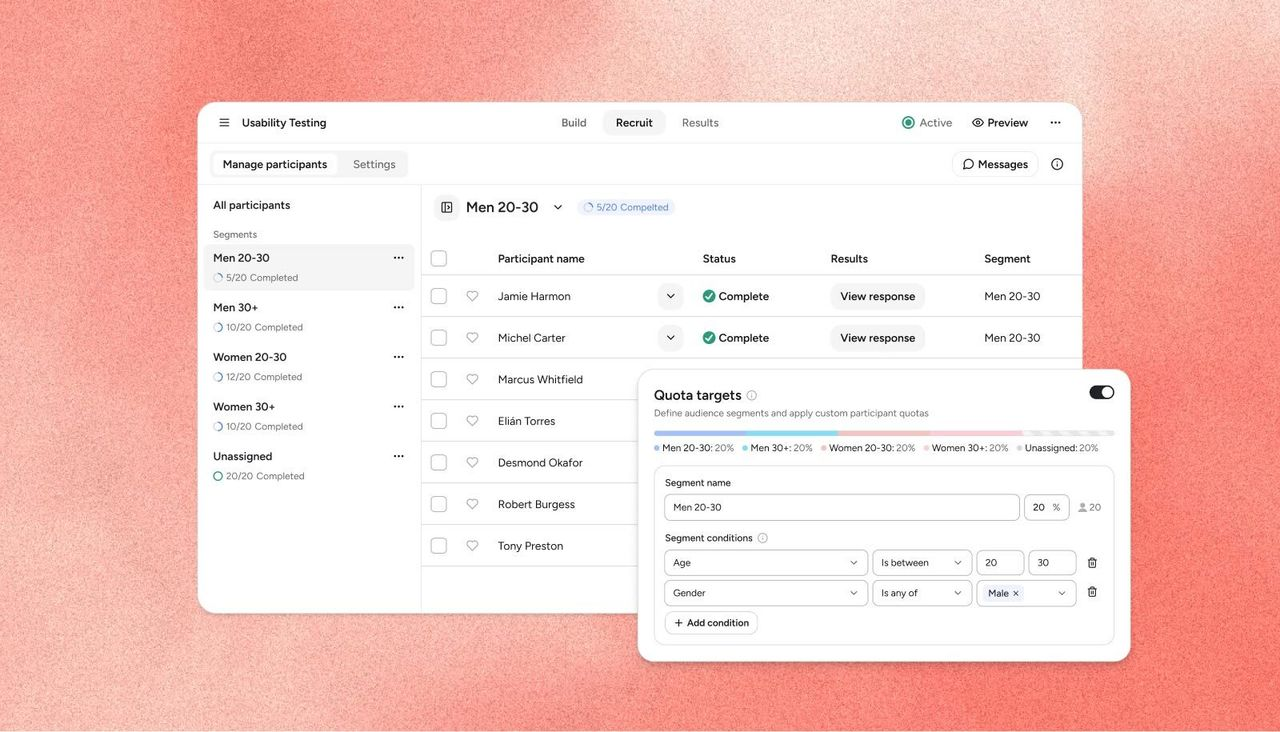
Quota targets are live on the Askable platform, giving you control over the makeup of your sample before recruitment starts.
What is this feature?
You can now split your audience into named segments and set how many participants you need from each one.
Build segments from age, gender, location and your screener answers, then give each one a number or a percentage: six in the US and four in the UK, 30% women aged 25 to 34 in Sydney, eight customers and eight non-customers. Askable recruits toward each segment and stops that segment once it’s full, so the study holds a place for every group instead of filling first come, first served.
You can watch each segment fill as recruitment runs, and segment assignments come through in your CSV export and as a filter on your results.
This feature is currently available on unmoderated, survey and AI-moderated studies.
Why does it matter?
Most studies aren’t about one audience. You’re comparing customers against non-customers, power users against occasional ones, or you need the UK represented alongside the US well enough to say something about both.
Until now that meant either running a separate study for each group and stitching the results together, or watching the recruit and hand-packing people to keep the mix right. Now you set the breakdown once before you launch, and recruitment holds it for you.
It also helps with the group you always struggle to reach. Their places stay open while the easier segments fill, so they don’t get crowded out by the audiences that were never going to be a problem.
Worth knowing before you set one up:
- Set your targets before launch. They can’t be edited while a study is live, though you can close a segment and redistribute it.
- A tightly defined segment, especially one stacked with screener conditions, can take longer to fill, or may not fill.
- Not available on moderated interviews, participant recruitment studies (where you run the research in your own tool) or BYO studies.
How do I access this feature?
This feature is already live and active in all Askable accounts. Contact your Enterprise Support Manager for more information, alternatively book a demo here.